
TL;DR

Turn quiet afternoons into listening time
- Thousands of audiobooks, podcasts and originals
- Listen on your phone, tablet or Echo — also offline
- Cancel anytime
To make light switches easier to use, identify whether the problem is seeing, reaching, understanding, or pressing the control. Start with simple options such as a contrasting plate, clear labels, a rocker switch, or a plug-in lamp with a remote; ask a qualified electrician about wiring, switch relocation, and compatibility. For important lights, offer more than one reliable way to turn them on.
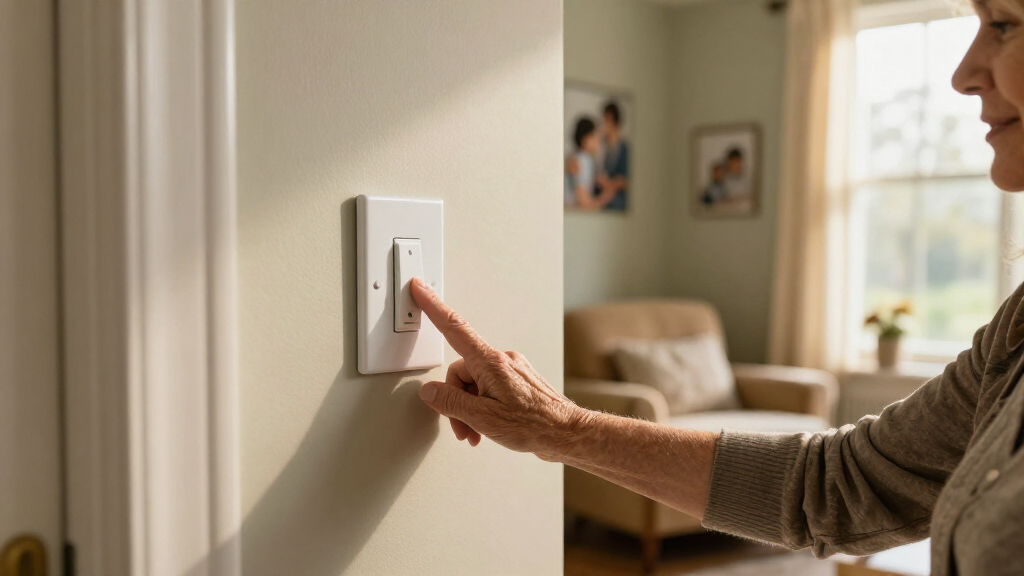
A light switch can be only a few inches from your hand and still feel out of reach when the room is dark, the plate blends into the wall, or the tiny toggle is hard to press. That small daily snag can make a familiar hallway or bedside routine less comfortable.
To make light switches easier to use, first notice what gets in the way: finding, reaching, recognizing, or operating the control. This guide walks you through practical changes, from a brighter plate or a clear label to remote controls and professionally installed switches. You’ll also learn what to check before changing wiring, so your lighting stays dependable and the person using it stays in control.
Identify whether the main difficulty is seeing, reaching, understanding, or pressing the switch before choosing a change.
Try contrast, clear labels, or a plug-in lamp with a remote when a simple adjustment may solve the problem.
A rocker or paddle gives a larger press area, while a remote may help when reaching is the bigger obstacle.
Check smart-switch wiring and bulb compatibility; some switches require a neutral wire and dimmers need compatible bulbs.
Keep a dependable backup control for important lights, especially when using voice, phone, or motion controls.
A practical guide · Everyday accessibility
How to Make Light Switches Easier to Use
Start by noticing what gets in the way: seeing, reaching, identifying, or pressing the control. Then choose a small, comfortable change that fits the person and the room.
Find the snag before choosing the fix
Notice the routine at the time it usually feels difficult. Ask the person what would feel comfortable and preserve the controls they value.
Hard to spot?
Try a contrasting plate, a clear marker, or a low-level night light near the doorway.
Too far away?
A wireless button or bedside remote can bring control closer to a chair or bed.
Unsure which one?
Use short, readable labels such as “ceiling,” “hall,” or “porch.”
Small or stiff?
A rocker, paddle, large button, or remote may be easier than a narrow toggle.
Choose a comfortable control
Size, motion, location, and feedback all matter. What feels easy varies from person to person.
Small changes can solve common problems
Begin with simple options when they fit. Electrical changes call for a qualified professional if the wiring or requirements are unfamiliar.
Increase contrast
A contrasting plate, colored border, or switch marker can stand out against the wall. Check that any glow is comfortable at night.
Label the result
Use clear, large words for grouped switches. Name the light they control rather than relying on memory.
Add a remote option
A plug-in lamp with a remote or a wireless button can bring a light within easier reach while keeping the wall switch available.
Plan placement around real life
Comfortable reach depends on the person, their usual position, furniture, the doorway, and local requirements.
important lights
Safety and reliability
Keep a dependable backup.
Voice, app, and motion controls can be useful alternatives, but they may fail when a phone is uncharged, internet access is unavailable, or a sensor is poorly set. Preserve a control the user can operate reliably.
Replacing a switch or relocating wiring can expose people to shock or create a fire risk if done incorrectly. Follow local rules and ask a qualified electrician about wiring, switch relocation, and compatibility.
Find the reason a switch feels difficult
A light switch gets easier to use when you match the change to the specific obstacle: seeing it, reaching it, recognizing its purpose, or pressing it. Those are four different problems, and a single expensive upgrade won’t solve all of them. Begin by watching how the person uses the switch during an ordinary day.
For example, your father may find the bedroom switch easily in daylight but miss it after he gets into bed. That points to visibility or reach, not necessarily a need to replace the switch. A bright label, a glow-in-the-dark marker made for switch plates, or a bedside remote may help more than rewiring.
Try the routine at the time it usually causes trouble. Notice whether the user has to stretch, search with their fingertips, remember which of several controls operates the overhead light, or press hard with a sore thumb. A short observation can be a useful map: the right fix follows the real snag.
Ask the person what would feel comfortable. A caregiver might see a wall switch as inconvenient while the person using it values the familiar click and location. Respecting that preference helps the improvement support independence instead of taking control away.
Products Worth Considering

Philips Hue White and Color Ambiance Smart Light Starter Kit with Bridge and 4 A19 Bulbs

Ring Alarm 5-Piece Wireless Security System

LEVOIT Vital 200S-P Smart Air Purifier for Large Rooms
As an affiliate, we earn on qualifying purchases.
Make a switch easier to spot in dim light
To make light switches easier to find at night, increase the contrast between the plate and wall, add a clear marker, or use an illuminated control where its glow won’t disturb anyone. A switch you can spot quickly is a bit like a bright bookmark in a dark book: it tells your hand where to go.
A white plate against a pale wall may disappear, while a dark plate or a colored border can stand out. You can also use a simple, readable label for a switch that controls a less obvious light. In a hallway, a night light near the doorway can make both the wall and the switch easier to see without changing the electrical setup.
Illuminated switches may help when you enter a dark room, but the small glow can bother someone who sleeps lightly. Try one in a guest room or hallway first, and check it at night from the user’s usual viewpoint. A plug-in night light may be a simpler answer if the main concern is moving safely between the bedroom and bathroom.
Consider a real evening routine: if your partner reaches for a switch beside the bed, a remote kept on the nightstand may be easier to find than a glowing wall plate across the room. Good visibility includes the control’s location and the path to it, not only the switch face.
Choose a control that is comfortable to press
A broad rocker or paddle control is often easier to press than a small toggle because it gives your finger a larger target. If grip or finger movement is limited, a large button, wireless remote, or other control may help even more. The best choice depends on what feels manageable to the person who will use it.
Imagine someone with stiff fingers trying to pinch a narrow toggle while holding a walking aid. A paddle can let them use the side of a hand or a flatter finger press. A remote on a bedside table may remove the reach altogether. These changes that make switches easier can be small, but comfort varies: a person who relies on a familiar toggle may prefer a labeled remote instead of a wall-control change.
When comparing options, try to assess not only the size but also the motion. Does the person need to pinch, push, tap, or hold a button? Do they receive a clear click or other feedback that confirms the light changed? These details can matter as much as the shape.
- Rocker or paddle: a larger press area for routine wall control.
- Large button or remote: a control that can sit where the user can comfortably reach it.
- Smart control: voice, phone, schedule, or wireless button options, if those suit the household.
Keep a familiar way to turn on important lights. A remote can be misplaced, and a phone can run out of charge; a dependable wall control is still useful.
Plan switch placement around the person using it
A switch is easier to use when it sits where the person can reach it comfortably from their usual position, whether standing or seated. If a switch requires a stretch, a careful step, or a transfer out of a chair, changing its location may help—but relocation usually involves electrical work and should follow local rules.
Think about the entry to a room, the approach from a wheelchair, and the position of furniture. A switch hidden behind a bookcase or blocked by a door can be difficult even at a comfortable height. Before a renovation, mark possible locations with removable tape and check whether the user can reach and operate them from the positions they use every day.
For instance, a grandmother who spends evenings in a recliner might find a wall control across the room inconvenient. A wireless button near her chair could offer a simpler option than moving the wired switch. If you are planning new wiring or relocating a control, ask a qualified electrician to check local accessibility and electrical requirements.
A usable layout should work for visitors and household members too. You might use a remote beside the favorite chair while keeping the doorway switch in place, so no one has to hunt for a control when entering. Comfortable placement follows the person’s routine; there is no single height that fits every room, user, and local code.
Label switch groups so you know what each one does
Clear, large labels make a group of switches easier to understand, especially when several controls sit together or operate lights from more than one location. Use short words that name the result—such as “ceiling,” “hall,” or “porch”—rather than relying on memory or guessing.
Consider a kitchen with three similar switches beside the door. One turns on the ceiling lights, another controls the under-cabinet lights, and the third operates a nearby hallway. A small label on each plate can save repeated trial and error. Choose lettering with strong contrast and a size the user can read comfortably.
For a multi-way setup, where switches in different locations control the same light, labels can explain what a control does, but don’t assume every switch position tells you whether the light is on. Some controls show their status; ordinary toggles may not. If the household has trouble understanding the arrangement, ask an electrician whether a clearly marked or status-indicating control fits the wiring.
Keep labels consistent across the home. If one plate says “main light” and another says “ceiling,” a visitor may wonder whether they refer to different fixtures. A caregiver can walk through the rooms with the person who uses them and choose wording together. Familiar labels make the house easier to read, like simple signs along a well-known path.
Add a remote, sensor, or smart control with a backup
A remote, motion sensor, or smart control can reduce reaching, but each works best when it fits the room and the person’s habits. For a quick change without rewiring, a plug-in lamp with a remote may be enough; a hardwired smart switch or sensor may need an electrician and compatibility checks.
Here is a practical way to choose:
- Start with the light. Check whether it is a plug-in lamp or a wired ceiling fixture.
- Choose a familiar control. A handheld remote, wall-mounted wireless button, voice command, app, or motion sensor may suit different routines.
- Check compatibility. Smart switches vary; some need a neutral wire, and dimmers must match the bulbs they control.
- Keep a second way to turn the light on. Retain a usable wall switch or add a backup button for important areas.
A motion sensor might be handy in a hallway when someone’s hands are full. Placement and timing matter, though: a sensor that switches off while a person is moving slowly can leave them in the dark. Test the settings with the actual routine and adjust them if the light turns off too soon.
Voice and app controls offer another option, but they rely on things like speech, a charged phone, or a working network. For important lights, more than one control path offers flexibility. A simple button can be the backup when technology isn’t convenient.
Know when to call an electrician
Call a qualified electrician when a change involves unfamiliar wiring, moving a wall switch, installing a hardwired smart control, or troubleshooting an existing electrical problem. Incorrect wiring can create shock or fire risks, so electrical work deserves careful handling and compliance with local rules.
Replacing a toggle with a rocker can sound straightforward, but the right method depends on the switch, wiring, and the person’s skills. A photo of the switch plate doesn’t show what is inside the wall. If the work requires opening the switch box or you are unsure how to isolate and verify the circuit, get professional help.
Smart controls need a compatibility check too. Some models require a neutral wire, and a dimmer must work with the bulb it controls. If a household has multi-way switching, older wiring, or a mix of bulb types, give the electrician the details and ask which options fit the setup.
For a lower-effort improvement, you can first try non-wiring changes such as clearer labels, a contrasting plate, or a plug-in lamp and remote. But stop using a switch that feels hot, smells burnt, sparks, or behaves erratically, and seek qualified help promptly. When electrical work is involved, safe installation is part of accessibility; a control only helps if it works reliably.
Frequently Asked Questions
What type of light switch is easiest to use?
A rocker or paddle switch often offers a larger press area than a small toggle. A remote or large button may be easier if reaching or finger movement is the main challenge. Try to match the control to the user’s routine and preference.
How can I make a switch easier to find at night?
Use a contrasting plate, a clear marker, an illuminated switch, or a nearby night light. An illuminated control can help in a hallway but may bother a light sleeper in a bedroom, so check it in the room at night before choosing it.
Can I add a remote without replacing the wall switch?
Often, you can use a plug-in lamp with a remote or a compatible wireless button system without changing the wall switch. Check that the remote works with the lamp or control system you have, and keep a usable backup for important lighting.
Are smart switches compatible with any bulb or wiring?
No. Compatibility varies by switch, wiring, smart-home system, and bulb. Some smart switches need a neutral wire, and dimmers must be rated for the bulbs they control, so check product requirements or ask an electrician.
When should I call an electrician?
Call a qualified electrician if you plan to relocate a switch, install a hardwired smart control, or work with wiring you don’t understand. Seek help promptly if a switch feels hot, smells burnt, sparks, or behaves unpredictably.
Conclusion
Start with the moment the switch becomes difficult: the dark doorway, the hard-to-reach bedside wall, the cluster of look-alike controls, or the stiff-fingered press. Then choose one practical change that addresses that exact snag, and ask the person who uses it whether it feels better.
A well-placed label, a broad paddle, or a remote by the chair can turn a small daily frustration into a smoother routine. The best light switch is the one you can find and use with confidence, leaving the room bright at the touch that feels right.