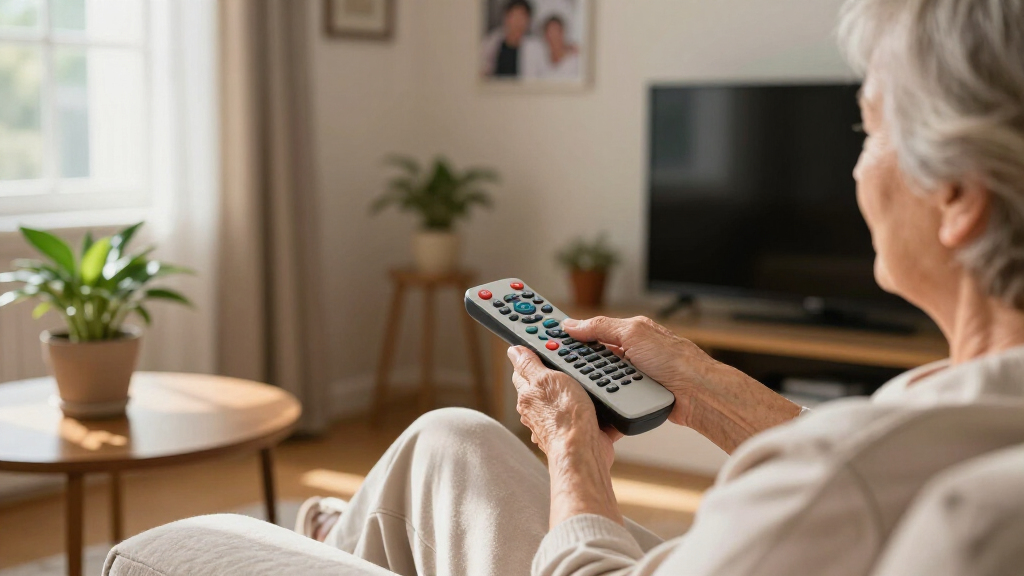

Finding the right remote for seniors often involves balancing simplicity, durability, and accessibility. The Flipper Big Button TV Remote stands out as the best overall choice thanks to its straightforward design and easy setup. The EZclicker Big Button Universal TV Remote offers great versatility, making it ideal for households with multiple devices. However, many options sacrifice some features for simplicity, so understanding the key tradeoffs—such as limited device compatibility or higher prices—can help you choose wisely. Continue reading for a detailed breakdown of each remote and what makes them suitable for different needs.

Turn quiet afternoons into listening time
- Thousands of audiobooks, podcasts and originals
- Listen on your phone, tablet or Echo — also offline
- Cancel anytime
Complete the kit


Key Takeaways
- The top picks excel in ease of use, with large, clearly labeled buttons and simple layouts.
- Device compatibility varies, with some remotes designed for specific brands and others offering universal compatibility.
- Durability and build quality are crucial, especially for seniors with cognitive or physical challenges.
- Pricing ranges from budget-friendly to premium, often reflecting the level of simplicity and features offered.
- Color coding and setup instructions significantly impact ease of use, particularly for seniors with dementia or visual impairments.
| Flipper Big Button TV Remote for Seniors, Dementia – Easy Setup |  | Best Overall for Simplified, Customizable TV Control | Compatibility: All major TV brands and cable providers | Button Layout: Large, color-coded, 4-button design | Customizable Channels: Up to 25 favorites | VIEW LATEST PRICE | See Our Full Breakdown |
| EZclicker Big Button Universal TV Remote, Easy to Use for All Ages (Orange) |  | Best for Ease of Use and Simplicity for All Ages | Button Size: Large | Compatibility: Major TV brands (not cable or streaming) | Dimensions: 7 x 2 x 1 inches | VIEW LATEST PRICE | See Our Full Breakdown |
| EZclicker TV Remote for Samsung TVs – Big Button, Easy to Use |  | Best for Samsung TV Users Who Want No Setup Hassle | Compatibility: Samsung TVs | Button Type: Big Button | Size: 7″ x 2″ x 1″ | VIEW LATEST PRICE | See Our Full Breakdown |
| Big Button TV Remote for Seniors, Dementia – Easy Setup with Large Color-Coded Buttons |  | Best for Dementia and Vision-Impaired Users Reclaiming Independence | Compatibility: All major TV brands and cable providers | Button Size: Large | Color Coding: Yes | VIEW LATEST PRICE | See Our Full Breakdown |
| EZclicker Big Button Universal TV Remote, Easy to Use for All Ages |  | Best for Versatility and Ease Across All Age Groups | Button Size: Extra-large | Compatibility: Most top brand TVs | Batteries: 2x AAA (not included) | VIEW LATEST PRICE | See Our Full Breakdown |
| EZclicker Big Button TV Remote for LG TVs |  | Best for LG TV Owners Who Need Simplicity and Tactile Feedback | Compatibility: LG TVs | Button Design: Big buttons with tactile feedback | Dimensions: 7″ x 2″ x 1″ | VIEW LATEST PRICE | See Our Full Breakdown |
| EZclicker TV Remote for Seniors, Extra Simple Big Button Remote (Blue) | 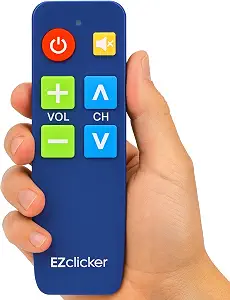 | Best for Multi-Brand TV Users Who Need Easy Programming | Button Size: Large | Compatibility: Top brand TVs (not for cable boxes or streaming devices) | Programming Method: Hold Mute & Volume+ for 60 seconds | VIEW LATEST PRICE | See Our Full Breakdown |
| big button remotes for senior | Compatibility | Batteries | Button Size | Dimensions |
|---|---|---|---|---|
| Flipper Big Button TV Remote f | All major TV brands and cable providers | Requires 2 AA batteries (not included) | — | — |
| EZclicker Big Button Universal | Major TV brands (not cable or streaming) | 2x AAA (not included) | Large | 7 x 2 x 1 inches |
| EZclicker TV Remote for Samsun | Samsung TVs | 2x AAA (not included) | — | — |
| Big Button TV Remote for Senio | All major TV brands and cable providers | — | Large | — |
| EZclicker Big Button Universal | Most top brand TVs | 2x AAA (not included) | Extra-large | 7 x 2 x 1 inches |
| EZclicker Big Button TV Remote | LG TVs | 2x AAA (not included) | — | 7" x 2" x 1" |
| EZclicker TV Remote for Senior | Top brand TVs (not for cable boxes or streaming devices) | 2x AAA (not included) | Large | 6" x 2" x 1" |
More Details on Our Top Picks
Flipper Big Button TV Remote for Seniors, Dementia – Easy Setup
This remote stands out for its tailored design that combines large, color-coded buttons with a simple 4-button layout, making it ideal for seniors and individuals with dementia. Unlike the EZclicker models, which focus on straightforward use but lack customization, the Flipper offers personalized channel favorites, significantly reducing frustration. Its universal compatibility ensures it works with most TVs and cable providers, but it’s limited to basic functions and doesn’t support streaming apps like Netflix or YouTube. The tradeoff here is that while setup is straightforward, users seeking advanced features or streaming app control will need different devices. This remote is perfect for those needing a straightforward, customizable TV experience without extra bells and whistles.
Pros:- Large, tactile, color-coded buttons for easy identification and use
- Universal compatibility with most TVs and cable providers
- Allows customization of favorite channels for quick access
Cons:- Limited to basic TV functions only; no streaming or smart features
- Requires 2 AA batteries (not included), adding to setup steps
Best for: Seniors and dementia patients who need simple, customizable TV access with tactile, color-coded buttons
Not ideal for: Users wanting to control streaming services or advanced smart TV features, as it lacks app support
- Compatibility:All major TV brands and cable providers
- Button Layout:Large, color-coded, 4-button design
- Customizable Channels:Up to 25 favorites
- Batteries:Requires 2 AA batteries (not included)
Our verdict“This remote is best for seniors who need a straightforward, customizable remote tailored to traditional TV control without complexity.”
EZclicker Big Button Universal TV Remote, Easy to Use for All Ages (Orange)
The EZclicker remote excels in its oversized buttons and tactile feedback, making it a solid choice for seniors and visually impaired users who need a straightforward device. Compared to the Flipper, which offers more customization, the EZclicker emphasizes quick setup and ease of use, though it doesn’t support cable boxes or streaming devices. Its compact, lightweight design ensures comfortable handling, but the need for batteries (not included) complicates immediate use. This remote makes the most sense for buyers prioritizing simplicity and tactile feedback over advanced features or broad compatibility. It’s an excellent choice for those new to remote controls or who want a no-fuss device for basic TV control.
Pros:- Large, easy-to-press buttons with tactile feedback
- Simple, minimal programming needed
- Lightweight and compact for easy handling
Cons:- Not compatible with cable boxes or streaming devices
- Batteries are not included, requiring an extra purchase
Best for: Seniors or visually impaired users seeking an uncomplicated, easy-to-program remote
Not ideal for: People who want to control cable boxes or streaming services, as it’s not compatible with those devices
- Button Size:Large
- Compatibility:Major TV brands (not cable or streaming)
- Dimensions:7 x 2 x 1 inches
- Batteries:2x AAA (not included)
Our verdict“This remote is ideal for users who want an uncomplicated, tactile device for basic TV control without extra features.”
EZclicker TV Remote for Samsung TVs – Big Button, Easy to Use
This remote is a streamlined choice specifically for Samsung TV owners, featuring large buttons and tactile feedback that require no programming. Unlike the Flipper or EZclicker models designed for broad compatibility, this remote’s fixed compatibility simplifies setup and use for Samsung users. However, it’s limited to Samsung TVs and doesn’t support streaming devices or cable boxes, which could be a drawback for users with multiple devices. Its lightweight design makes it easy to handle, but the lack of multi-device control means it’s best for those with only Samsung TVs. This remote is an excellent pick for seniors who want a plug-and-play solution to manage their Samsung television easily.
Pros:- Large buttons with tactile feedback for easy use
- No programming required; plug-and-play
- Lightweight and easy to handle
Cons:- Limited to Samsung TVs only; no multi-device control
- Batteries are not included, requiring purchase
Best for: Seniors with Samsung TVs who need a no-fuss, large-button remote
Not ideal for: Users with multiple device setups, including streaming sticks or cable boxes, as it’s Samsung-specific
- Compatibility:Samsung TVs
- Button Type:Big Button
- Size:7″ x 2″ x 1″
- Batteries:2x AAA (not included)
Our verdict“This remote is best for Samsung TV owners seeking a simple, ready-to-use device without setup hassle.”
Big Button TV Remote for Seniors, Dementia – Easy Setup with Large Color-Coded Buttons
This remote emphasizes large, color-coded buttons, making it highly suitable for seniors with dementia or impaired vision. Compared with the Flipper, which offers more advanced customization, this model prioritizes simplicity and visual cues to aid independence. It supports all major TV brands and cable services, but it’s limited to basic functions, which may disappoint those seeking smart features or streaming control. Line-of-sight operation and potential need for IR extenders are tradeoffs for its straightforward design. Overall, this remote is ideal for users who require a highly visual, easy-to-remember device that helps regain control of their TV routines without complexity.
Pros:- Large, color-coded buttons for easy identification
- Universal compatibility with major TV brands and cable providers
- Helps promote independence for users with impairments
Cons:- Requires line of sight; may need IR extenders for some setups
- Limited to basic functions; no smart or streaming support
Best for: Seniors with dementia or vision impairments needing large, color-coded buttons for simple TV control
Not ideal for: Tech-savvy users seeking advanced features, streaming support, or smart home integration
- Compatibility:All major TV brands and cable providers
- Button Size:Large
- Color Coding:Yes
- Works with:TV, cable/satellite boxes, soundbars
- Warranty:90 days
Our verdict“This remote is best for seniors needing a visually intuitive device to regain independence with basic TV control.”
EZclicker Big Button Universal TV Remote, Easy to Use for All Ages
This remote offers extra-large buttons and broad compatibility with most top brand TVs, making it a versatile, user-friendly choice for seniors and anyone with limited dexterity. Unlike the Flipper or specialized models, it emphasizes ease of programming and handling, but it’s limited to TV control only and doesn’t support cable boxes or streaming devices. Its lightweight, compact design simplifies handling for users who struggle with smaller remotes. However, its lack of smart device support means it won’t suit those seeking to control streaming apps or multiple devices. It’s an excellent pick for households needing a straightforward, accessible remote for traditional TV viewing, especially if versatility across brands is a priority.
Pros:- Extra-large, easy-to-press buttons for comfort and accessibility
- Compatible with most top brand TVs
- Lightweight and simple to program
Cons:- Limited to TV control; no streaming or cable box support
- Batteries are not included, requiring purchase
Best for: Seniors who want a simple, universal remote compatible with most top brand TVs
Not ideal for: Users with multiple streaming devices or cable boxes, as it doesn’t support those functionalities
- Button Size:Extra-large
- Compatibility:Most top brand TVs
- Batteries:2x AAA (not included)
- Dimensions:7 x 2 x 1 inches
Our verdict“This remote suits seniors seeking a straightforward, universal device for traditional TV control without added complexity.”
EZclicker Big Button TV Remote for LG TVs
This remote is tailored specifically for LG TV users who require large, tactile buttons for easier control. Compared to the EZclicker TV Remote for Seniors, Extra Simple Big Button Remote, it offers a more streamlined design focused solely on LG compatibility, which makes setup straightforward if you own an LG TV but limits its versatility. The large, textured buttons provide excellent feedback, reducing accidental presses—ideal for seniors with limited dexterity. However, its exclusive compatibility means it won’t work with other TV brands or streaming devices, which could be a drawback for households with mixed devices. The remote’s lightweight, simple design makes it easy to handle for users who struggle with smaller remotes, but missing included batteries might cause initial frustration.
Pros:- Large, easy-to-press tactile buttons
- Simple and lightweight for easy handling
- Tailored specifically for LG TV compatibility
Cons:- Only compatible with LG TVs, limiting versatility
- Batteries not included, which may delay setup
Best for: LG TV owners who want a straightforward, tactile remote with no fuss
Not ideal for: Households with multiple TV brands or streaming devices, as it’s limited to LG TVs
- Compatibility:LG TVs
- Button Design:Big buttons with tactile feedback
- Dimensions:7″ x 2″ x 1″
- Batteries:2x AAA (not included)
Our verdict“This remote is perfect for LG TV owners seeking a dedicated, easy-to-use remote with tactile feedback, but it’s unsuitable for households with multiple devices.”
EZclicker TV Remote for Seniors, Extra Simple Big Button Remote (Blue)
Compared with the LG-specific EZclicker Big Button TV Remote for LG TVs, this version offers broader compatibility with top TV brands, making it more versatile for households with different TVs. Its large, tactile buttons are designed for easy use by seniors with limited dexterity, and the simple programming method—holding Mute & Volume+ for 60 seconds—avoids complex setups. The remote’s compact and lightweight design makes it comfortable for extended use. However, it doesn’t support streaming devices or cable boxes, which could be limiting for some users. Its exclusive focus on TV control means it’s less suitable for those wanting a single remote for multiple devices, but for straightforward TV operation, it’s a reliable choice.
Pros:- Large buttons with tactile feedback for easy use
- Simple, intuitive programming process
- Compatible with major TV brands
Cons:- Limited to TV control only, no streaming or cable box support
- Batteries not included
Best for: Seniors with multiple TV brands who want a simple, programmable remote
Not ideal for: Users needing to control cable boxes or streaming devices, as it’s limited to TV functions
- Button Size:Large
- Compatibility:Top brand TVs (not for cable boxes or streaming devices)
- Programming Method:Hold Mute & Volume+ for 60 seconds
- Dimensions:6″ x 2″ x 1″
- Batteries:2x AAA (not included)
Our verdict“This remote provides a straightforward, multi-brand solution for seniors seeking simplicity in TV control without the need for device-specific features.”

How We Picked
I evaluated each remote based on usability, button size and clarity, device compatibility, build quality, and ease of setup. Priority was given to products that simplify remote control for seniors, especially those with cognitive or motor challenges. I also considered value for money, ensuring options provide a good balance between affordability and essential features. The ranking reflects a mix of user-friendliness, durability, and versatility, helping buyers identify the best fit for different needs and lifestyles.| big button remotes for senior | Compatibility | Button Size |
|---|---|---|
| Flipper Big Button TV Remote f | All major TV brands and cable providers | — |
| EZclicker Big Button Universal | Major TV brands (not cable or streaming) | Large |
| EZclicker TV Remote for Samsun | Samsung TVs | — |
| Big Button TV Remote for Senio | All major TV brands and cable providers | Large |
| EZclicker Big Button Universal | Most top brand TVs | Extra-large |
| EZclicker Big Button TV Remote | LG TVs | — |
| EZclicker TV Remote for Senior | Top brand TVs (not for cable boxes or streaming devices) | Large |
Factors to Consider When Choosing Best Big Button Remotes For Seniors
Choosing the best big button remote for seniors involves considering several key factors. While simplicity is paramount, it’s also important to think about device compatibility, durability, and how easy it is to set up and use daily. A well-chosen remote can reduce frustration and enhance independence, but the wrong choice may lead to confusion or frustration. Below are some critical factors to keep in mind, along with broader considerations that help make a smart purchase decision.Ease of Use and Button Design
Look for remotes with large, tactile buttons that are clearly labeled and easy to distinguish by touch. Bright colors and high contrast improve visibility, especially for users with visual impairments. Avoid complicated layouts with numerous small buttons, which can be overwhelming. The simplest design often favors fewer buttons with straightforward functions, reducing confusion and making daily use more manageable.
Device Compatibility
Check whether the remote is designed for universal use or tailored to specific brands like Samsung or LG. Universal remotes offer more flexibility for households with multiple devices, but some may require more setup or have limited compatibility with certain TV models. Be cautious of remotes that only work with specific brands if you plan to control multiple devices, as this can limit flexibility and increase frustration.
Durability and Build Quality
For seniors, especially those with cognitive or motor challenges, a sturdy remote that withstands drops and spills is essential. Look for models with strong, non-slip materials and simple button surfaces that are resistant to wear. Cheaper plastic remotes might break more easily or become unresponsive over time, so investing in a durable build can save money and frustration in the long run.
Setup and Instructions
Easy setup is a major advantage, particularly for users who aren’t tech-savvy. Remotes with clear, step-by-step instructions or those that require minimal programming are preferable. Some models come pre-programmed or with straightforward pairing methods, reducing the need for technical assistance. Avoid overly complex setup procedures that can discourage or delay use.
Price and Value
Prices for big button remotes vary widely, often reflecting build quality and feature set. Budget options can be effective for basic use but may lack durability or compatibility. Premium models tend to offer better materials, more features, and easier setup, but at a higher cost. Consider your budget alongside your specific needs—sometimes paying a bit more yields a significantly better experience and longevity.
Frequently Asked Questions
Will a universal big button remote work with my specific TV model?
Most universal remotes are designed to work with a wide range of brands and models, but compatibility isn’t guaranteed for every device. It’s important to check the remote’s compatibility list or perform a quick compatibility test if possible. Some models can be programmed easily using code searches, while others might require more trial and error. If you have a unique or older TV, verify the remote’s compatibility before purchasing to avoid frustration.
Are these remotes suitable for seniors with dementia?
Yes, many of these big button remotes are specifically designed to be intuitive for users with dementia or cognitive decline. Features like large, color-coded buttons, simple layouts, and minimal functions help reduce confusion. However, it’s best to choose models with straightforward operation and avoid remotes with complex menus or multiple functions. Proper setup and labeling can further improve usability for these users.
How durable are these remotes for everyday use?
Durability varies among models, with higher-quality remotes often featuring sturdy plastic shells and resistant buttons. Remotes designed specifically for seniors tend to be more robust, as they are built to withstand drops and frequent use. However, even budget-friendly options should be handled with care to extend their lifespan. Look for reviews mentioning build quality if durability is a priority for your household.
Can I program these remotes myself, or do I need professional help?
Most big button remotes are designed for easy self-programming, often with clear instructions or auto-code search features. Many models can be paired with your TV in just a few minutes, making them accessible for most users. If you encounter difficulties, customer support or online tutorials can be helpful. Complex programming is rare in this category, but some models may require patience and careful following of instructions.
Is the price worth it for better build quality and features?
Investing in a higher-priced remote often means better durability, easier setup, and more reliable compatibility. For seniors who will use the remote daily, paying a bit more can translate into fewer frustrations and a longer lifespan. However, budget options can still be effective if you prioritize simplicity and basic functionality. Weigh your budget against your specific needs and the importance of features like durability and compatibility.
Conclusion
The best overall choice for most seniors is the Flipper Big Button TV Remote, thanks to its simple design and reliable performance. For those seeking the best value, the EZclicker Universal Remote offers excellent versatility without a steep price. If budget is a concern, basic models with large, tactile buttons still provide meaningful improvements over standard remotes. For users with specific brand needs, dedicated remotes for Samsung or LG are ideal. Finally, seniors with cognitive challenges or dementia should prioritize remotes with color-coded, straightforward controls. Tailoring your choice to your household’s unique needs will make the daily TV experience much easier and more enjoyable.
Halloween Picks

Gemmy 6-Foot Leatherface Animatronic Halloween Decoration

Gemmy 6.4 ft Beetlejuice Animatronic Halloween Decoration with Spinning Head

6-Foot Jason Voorhees Animatronic Halloween Decoration
As an affiliate, we earn on qualifying purchases.