
TL;DR

Turn quiet afternoons into listening time
- Thousands of audiobooks, podcasts and originals
- Listen on your phone, tablet or Echo — also offline
- Cancel anytime
Medical alert systems use various networks—cellular, Wi-Fi, landline—to connect users with 24/7 monitoring centers. Advances like GPS and 4G/5G boost reliability, ensuring help arrives fast, wherever you are. Knowing how these connections work helps you choose the right system for safety and peace of mind.
Imagine pressing a button and instantly reaching a trained responder, no matter where you are. That’s the power of a well-connected medical alert system. It’s not just a panic button — it’s a lifeline that depends on complex, reliable technology working behind the scenes.
In this guide, you’ll see how these systems connect through multiple networks, the latest tech upgrades, and what makes some more dependable than others. Understanding this network magic helps you pick a system that truly keeps you safe, whether at home or outside.
Most modern medical alert systems rely on cellular networks, which offer broader coverage and faster response times than landlines.
Backup batteries and network switching are vital for maintaining connection during power outages or network failures.
Advanced features like GPS, smart home integration, and 4G/5G connectivity significantly boost reliability and safety.
When choosing a system, consider coverage area, ease of use, and whether it has redundancy options.
A connected system’s effectiveness depends on understanding its network technology and ensuring it fits your lifestyle.
How Medical Alert Systems Connect to Help
Pressing one button starts a carefully engineered chain: the device finds a network, reaches a 24/7 monitoring center, opens two-way communication and gives responders the information needed to act. The strongest systems add backup power, network switching and precise location data so that chain stays intact.
Three routes to the same destination
Every connection type can reach a monitoring center, but each behaves differently across the home, outdoors and during an outage. The right choice depends on where the user spends time and which networks are dependable there.
Landline
A home base station places a call through a traditional telephone line. It can be dependable in one location, but the wearable usually works only within range of the base.
Wi-Fi
The device uses the home internet connection, making app features and smart-home integration easier. Router power and broadband stability become important links in the chain.
Cellular + GPS
A portable unit uses cellular towers for voice and data while GPS helps identify location. It offers the broadest mobility, subject to local signal coverage.
What happens after the button press?
The interaction feels instant because the technology compresses several tasks into one rapid sequence. A trained responder remains the human decision point at the center of the process.
Alert triggered
A pendant, wristband, base unit or automatic detector activates the emergency signal.
Network selected
The device sends the alert through cellular, Wi-Fi or a landline connection.
Responder connects
Monitoring staff open two-way voice, confirm identity and assess what is happening.
Help dispatched
The center contacts family, a caregiver or emergency services and shares location details.
Backup batteries preserve power. Connection checks identify faults. Dual-path systems can move from Wi-Fi to cellular when the primary network fails.
Connection methods compared
No network is perfect everywhere. Cellular leads on mobility, Wi-Fi supports connected-home features and landlines can remain a simple fixed-location option. Redundancy matters more than any single headline feature.
| Decision factor | Landline | Wi-Fi / internet | Cellular + GPS |
|---|---|---|---|
| Works around the home | ✓ Strong | ✓ Strong | ✓ Strong |
| Works away from home | ✗ No | ✗ Limited to Wi-Fi | ✓ Designed for mobility |
| Location tracking | ✗ Fixed address | ~ Network dependent | ✓ GPS supported |
| Power-outage resilience | ~ Varies by line type | ~ Router backup needed | ✓ Device battery |
| Smart-home integration | ✗ Minimal | ✓ Strong | ~ App dependent |
| Primary limitation | Fixed location | Internet and router uptime | Local tower coverage |
Ratings are practical connection profiles, not guarantees. Always test the actual device in the rooms, yard and travel areas where it will be used.
The technology is becoming faster and smarter
Modern systems increasingly combine communication, location and automation. These upgrades can reduce uncertainty for responders, but they still depend on coverage, power and a well-tested service plan.
Cellular is now the dominant route
The provided industry overview indicates that more than nine in ten modern systems rely on cellular connectivity.
Cellular expands the safety zone beyond the base station, while GPS gives monitoring staff a more useful location when the user cannot explain where they are.
Four upgrades shaping the next generation
The most valuable innovations strengthen either speed, context, resilience or ease of use.
4G / 5G
Current mobile networks improve data speed, capacity and long-term compatibility over retired legacy networks.
Advanced GPS
Location data helps responders find mobile users in parks, unfamiliar areas or other places away from home.
Smart-home links
Cameras, doorbells, apps and voice assistants can add context and broaden the household safety net.
AI analytics
Pattern analysis may flag anomalies or rising risk, supporting earlier and more proactive intervention.
Five checks before choosing a system
A strong buying decision starts with real-world conditions—not a feature list. Match the connection to the user’s routines, building, neighborhood and ability to manage the device.
Coverage
Test bedrooms, bathrooms, basement, yard and frequent outdoor routes for usable signal.
Backup power
Confirm battery duration and whether the router or base station also stays powered.
Redundancy
Look for automatic network switching, connection alerts and routine self-tests.
Ease of use
Prioritize a large button, clear audio, simple charging and comfortable daily wear.
Privacy
Ask how voice, location and health-related data are encrypted, stored and shared.
The complete safety chain
Choose the connection that works where life actually happens. Cellular and GPS support mobility; Wi-Fi enables connected-home features; landlines serve fixed locations. Whatever the primary route, backup power, automatic switching and regular testing turn connectivity into dependable protection.
How Do Medical Alert Systems Talk to Help in a Snap?
When you press the emergency button on your device, it sends a signal through a specific network—cellular, Wi-Fi, or landline—to a monitoring center. Think of it as a dedicated phone call that happens in a flash. This connection is what allows help to arrive quickly, whether it’s a family member, caregiver, or emergency services.
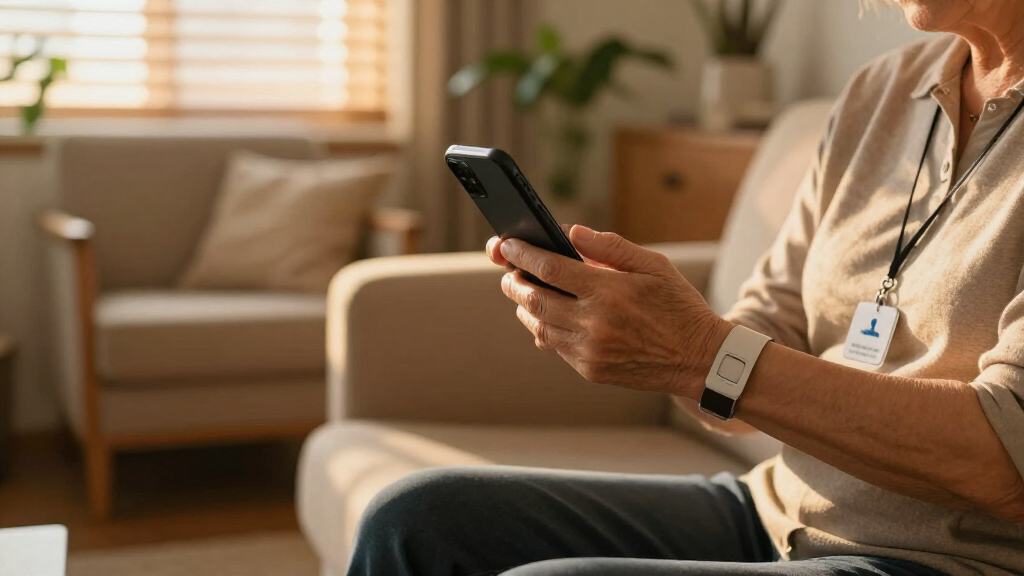
For example, a senior wearing a pendant might be outside, in her garden. When she presses her device, it uses her mobile network to reach the monitoring center. The staff then assesses her situation and dispatches help if needed. This rapid communication is the core of a medical alert system’s ability to save lives.
Products Worth Considering

eufy Security Essential 7-Piece Alarm System

Ring Alarm 5-Piece Wireless Security System

Bose SoundLink Flex (2nd Gen) Portable Bluetooth Speaker
As an affiliate, we earn on qualifying purchases.
What Are the Main Ways These Systems Connect to Help You?
Medical alert systems primarily connect via three methods:
- Landline and Cellular Networks: Traditional systems depend on landline phones or mobile networks. Cellular systems use towers to stay connected, making them more flexible.
- Wi-Fi and Internet-Based Systems: Use your home’s Wi-Fi to communicate. These are common in newer devices that integrate with smart home tech.
- Mobile and GPS Devices: Portable units with cellular data and GPS. Perfect for outdoor adventures or active lifestyles, ensuring help is available anywhere.
Understanding these connection types is crucial because each has tradeoffs. Landlines are generally reliable but lack flexibility; Wi-Fi depends on your internet stability, which can be compromised during outages; and mobile/GPS devices offer mobility but rely heavily on cellular coverage, which varies by location. Choosing the right method involves balancing coverage, reliability, and convenience based on your lifestyle.
How Do These Connection Methods Work in Real Life?
Here’s the typical flow: You press your device’s button. It transmits a signal through its chosen network—say, cellular or Wi-Fi. The signal reaches the monitoring center staffed 24/7. The responder then talks to you, assesses your needs, and calls emergency services if necessary.
Imagine a woman at her kitchen counter. She accidentally slips and presses her pendant. The system uses Wi-Fi to connect to the monitoring center. Seconds later, a responder confirms she’s okay or dispatches help. It’s seamless, fast, and crucial in emergencies.
These methods work in tandem to reduce response times, but they also depend on the quality of the network connection. For instance, Wi-Fi may be unreliable during a power outage if not backed up properly, and cellular signals can be weak inside certain buildings or remote areas. Understanding how these factors influence real-life scenarios can help you choose a system that minimizes delays in critical moments.
How Do Modern Systems Keep You Connected When Power Fails or Networks Drop?
Many systems include backup batteries that keep the device working during power outages. Others switch automatically between networks—like from Wi-Fi to cellular—to maintain connection. Redundancy ensures you’re never left stranded just when you need help most.
For example, during a storm, a system might lose Wi-Fi but switch to cellular, keeping the connection alive. Some systems even alert you if the connection drops, so you can try to troubleshoot or move closer to a signal.
This redundancy is critical because it directly impacts safety. If your system cannot connect when needed, it defeats its purpose. Therefore, investing in systems with multiple layers of backup and automatic network switching offers the best protection, especially in unpredictable situations where every second counts.
What Are the Coolest New Tech Features Connecting These Systems Today?
Recent upgrades make these systems smarter and more reliable:
- Integration with Smart Home Tech: Connects with doorbells, security cameras, and voice assistants for a comprehensive safety net.
- Advanced GPS and Location Tracking: Devices can pinpoint your exact spot outdoors, even in dense woods or big parks.
- Faster Networks with 4G/5G: Boosts speed and coverage, reducing response times and improving reliability.
- AI and Data Analytics: Some systems analyze call patterns, potentially predicting emergencies before they happen.
These features are transforming emergency response from reactive to proactive, allowing for earlier intervention and tailored safety solutions. For example, AI-driven analytics can identify patterns indicating increased fall risk or health decline, enabling preventative measures before a crisis occurs. As these innovations continue, they make medical alert systems more integrated into your overall safety ecosystem, offering peace of mind with smarter technology.
Why Do Connection Choices Matter for Your Safety?
Your system’s ability to connect reliably isn’t just about convenience—it’s about safety. Cellular networks cover more ground than landlines, especially if you’re outdoors or traveling. The faster the connection, the quicker help arrives.
For instance, a GPS-enabled device with 4G or 5G can deliver your exact location in seconds, critical if you’re lost outside or in an unfamiliar area. Poor or unstable connections can delay help, turning a minor fall into a serious situation.
Choosing the right connection type directly impacts how quickly and effectively help can reach you. A system with multiple connection options—like cellular, Wi-Fi, and backup batteries—provides a safety net that adapts to changing circumstances, reducing the risk of being unprotected when it matters most. This layered approach is essential for comprehensive safety, especially in areas with spotty coverage or during emergencies where every second counts.
What Should You Look for When Choosing a System’s Connection Type?
- Coverage Area: Will it work inside your home, yard, or when you’re out and about? Consider areas where you spend most of your time and ensure the system covers those zones reliably.
- Power Backup: Does it have a battery backup if power goes out? This prevents loss of connectivity during outages, which are often unpredictable and prolonged.
- Network Compatibility: Is it compatible with your mobile provider and local networks? Mismatched technology can lead to dead zones, so verify compatibility before purchasing.
- Ease of Use and Setup: Is it straightforward to activate and operate? Complex systems may discourage regular testing, which is vital for reliability.
For example, if you often hike in remote areas, a GPS device with cellular service and long battery life is a smart choice. It’s about matching the technology to your lifestyle and understanding that some tradeoffs—like convenience versus coverage—are inevitable. The key is to prioritize features that align with your safety needs.
How Do You Pick a Reliable, Connected Medical Alert System?
Focus on systems that use cellular networks with nationwide coverage and have backup power sources. Check reviews for real-world reliability, especially during outages. Also consider whether the device integrates with smart home tech or GPS for outdoor use.
Evaluating these factors helps you avoid systems that may fail just when you need help the most. A reliable system should have multiple layers of redundancy—such as backup batteries, multiple network options, and strong security protocols—to ensure continuous operation. This comprehensive approach minimizes the risk of missed alerts and guarantees that your safety isn’t compromised by technical failures.
Your Connection to Help Is Only as Good as Its Weakest Link
Even the best technology can falter if networks are unreliable or power fails. That’s why redundancy—multiple ways to connect—is key. Backup batteries, switching between Wi-Fi and cellular, and alerting you to connection issues all matter.
Think of your system as a safety net—if one thread breaks, others catch you. Regularly test your device and stay informed about network coverage in your area.
Understanding the limitations of your system’s connectivity allows you to take proactive steps—like ensuring your batteries are charged, staying updated on network outages, and positioning your device optimally—to maintain a dependable connection at all times. Recognizing these vulnerabilities empowers you to make smarter choices about your safety equipment and ensures help is always within reach.
What’s the Bottom Line? Connection Means Confidence
Knowing how your medical alert system connects and how reliable those connections are gives you peace of mind. It’s not just about having a button—it’s about making sure help arrives when you need it, no matter the circumstances.
Choose a system that uses robust networks, has backup options, and fits your lifestyle. That’s the best way to stay safe, confident, and independent.
Frequently Asked Questions
How do medical alert systems stay connected during a power outage?
Most systems come with backup batteries that keep the device working for several hours during outages. Always check the battery life and keep it charged to ensure continuous protection.Can these systems work outside the home?
Yes, especially mobile and GPS-enabled systems that use cellular networks. They’re designed for outdoor use and can locate you anywhere within cellular coverage.Are medical alert systems secure and private?
Reputable systems use encryption and secure data protocols to protect your information. Always ask about data security when choosing a provider.What happens if the system loses connection?
Some systems alert you if connection is lost, while others automatically switch to backup networks like cellular to stay connected. Regular testing helps ensure reliability.Are these systems easy to set up and operate?
Most are designed for simplicity, with straightforward activation and minimal setup. Many systems also include step-by-step instructions or remote assistance.Conclusion
Remember, a medical alert system is only as dependable as its connection to help. You don’t want to be left stranded because of a weak signal or power failure. Prioritize systems with strong, redundant connectivity, and test them regularly.
Ultimately, knowing that your help line is always open turns a simple device into a true safety partner—keeping you confident and secure, every step of the way.