TL;DR

Turn quiet afternoons into listening time
- Thousands of audiobooks, podcasts and originals
- Listen on your phone, tablet or Echo — also offline
- Cancel anytime
Before choosing a medical alert service, ask about coverage, device types, monitoring quality, costs, and extra features. Knowing these helps you pick a system that’s reliable, easy to use, and right for you.
Choosing a medical alert system isn’t just about picking the most popular brand or the cheapest option. It’s about asking the right questions to make sure it genuinely meets your safety needs and lifestyle.
Imagine feeling confident that help is just a button away, whether you’re at home, out running errands, or on a walk. This guide will walk you through the key questions to ask, so you can make a smart, informed choice — and sleep a little easier at night.
Always verify if the system covers your specific location and daily activities.
Prioritize devices that are easy to wear, use, and maintain—especially for seniors with impairments.
Check the monitoring center’s staffing, location, and certifications for dependable emergency response.
Understand all costs upfront, including setup, monthly fees, and cancellation policies.
Consider advanced features like GPS, fall detection, and smart home integration for added safety.
What to Ask Before Choosing a Medical Alert Service
TL;DR: Before choosing a medical alert service, ask about coverage, device types, monitoring quality, costs, battery backup, usability, privacy, and extra features. The right system should fit real daily life, not just look good in a brochure.
Key insight
Systems with 24/7 monitoring and fall detection can reduce emergency response times by up to 50%, making dependable monitoring a safety-critical choice.
Start With Life, Not the Device
A medical alert service should match where you actually spend time. In-home systems may be enough for some people, while active users often need cellular coverage, GPS tracking, and portable devices that work outside the front door.
Where will it work?
Ask whether the service covers your exact location, including rooms, yard, neighborhood walks, stores, and regular travel routes.
What will you actually wear?
Compare pendants, wristbands, mobile buttons, and smartwatches. Comfort matters because the device only helps if it is worn consistently.
Can it be used under stress?
Look for large buttons, clear audio, simple charging, and options for users with arthritis, low vision, hearing loss, or speech limitations.
Monitoring Quality Is the Core Safety Feature
The monitoring center determines what happens after the button is pressed. Ask who answers, where they are located, how they are trained, and whether the center holds emergency-response certifications such as UL listing.
Always-on response
Confirm 24/7 live monitoring, average response times, backup centers, and how operators handle accidental alerts.
Familiar emergency routing
U.S.-based centers may provide more familiar dispatch coordination and clearer communication with local responders.
Training and certification
Ask about certifications, operator protocols, language support, false alarm handling, and caregiver notification rules.
Compare the Service Model
Cheap monthly pricing can hide equipment fees, long contracts, weak coverage, or missing safety features. Use this checklist to compare plans side by side before signing.
| Question to ask | Basic in-home | On-the-go cellular | Premium connected | Why it matters |
|---|---|---|---|---|
| Works outside the home? | ✗ | ✓ | ✓ | Outdoor coverage is essential for errands, walks, appointments, and travel. |
| GPS location support? | ✗ | ✓ | ✓ | GPS helps responders find the user when they cannot explain where they are. |
| Fall detection included? | ~ | ~ | ✓ | Fall detection is useful but not perfect, so manual activation still matters. |
| Backup power available? | ✓ | ~ | ✓ | Backup power keeps protection active during storms and outages. |
| Month-to-month option? | ~ | ✓ | ~ | Flexible cancellation helps if health needs, housing, or budgets change. |
Cost, Battery, and Setup Tradeoffs
The right plan balances budget with reliability. Ask about upfront equipment, monthly fees, add-on charges, cancellation rules, daily charging routines, and professional installation.
Monthly Cost Spectrum
Long-term contracts may lower the monthly number but reduce flexibility. Month-to-month plans may cost more, yet they make it easier to switch if needs change.
The Question Flow
Move through the decision in order: safety context first, then device fit, response quality, costs, and privacy. This keeps flashy add-ons from distracting from core protection.
Map routines
Home, errands, walks, driving, appointments, and travel.
Choose device
Pendant, wristband, mobile button, smartwatch, or hybrid.
Verify response
24/7 staffing, certifications, dispatch rules, and caregivers.
Audit costs
Setup, equipment, monthly fees, contracts, trials, cancellation.
Check trust
Privacy, data security, support quality, and real user reviews.
Useful extras should solve a real problem.
Smart home integration, AI-assisted fall detection, telehealth links, remote health monitoring, medication reminders, and two-way voice can improve independence when they fit the user’s routine.
- Ask about privacy: confirm encryption, access controls, retention policies, and who can see personal health data.
- Ask about reliability: confirm battery life, replacement schedules, cellular coverage, water resistance, and outage backup.
- Ask about support: confirm installation help, caregiver setup, troubleshooting hours, and cancellation steps before purchase.
- Ask about fall detection: treat it as an added layer, not a replacement for pressing the button when possible.
Does the service cover your location and lifestyle?
The first thing to ask: Will the system work where you need it most? Some services only cover in-home use, while others include on-the-go options like GPS-enabled devices for outdoor activities.
For example, if you love walking in the park, a system with GPS tracking is crucial. If you only need help inside your house, a basic landline or Wi-Fi system might suffice.
Knowing whether the service covers your area and suits your daily routines saves you from surprises later.
Products Worth Considering

Ring Alarm 14-Piece Wireless Security System Kit

Ring Alarm 5-Piece Wireless Security System

Bose SoundLink Flex Bluetooth Speaker (2nd Gen), Black
As an affiliate, we earn on qualifying purchases.
What types of devices does the service offer?
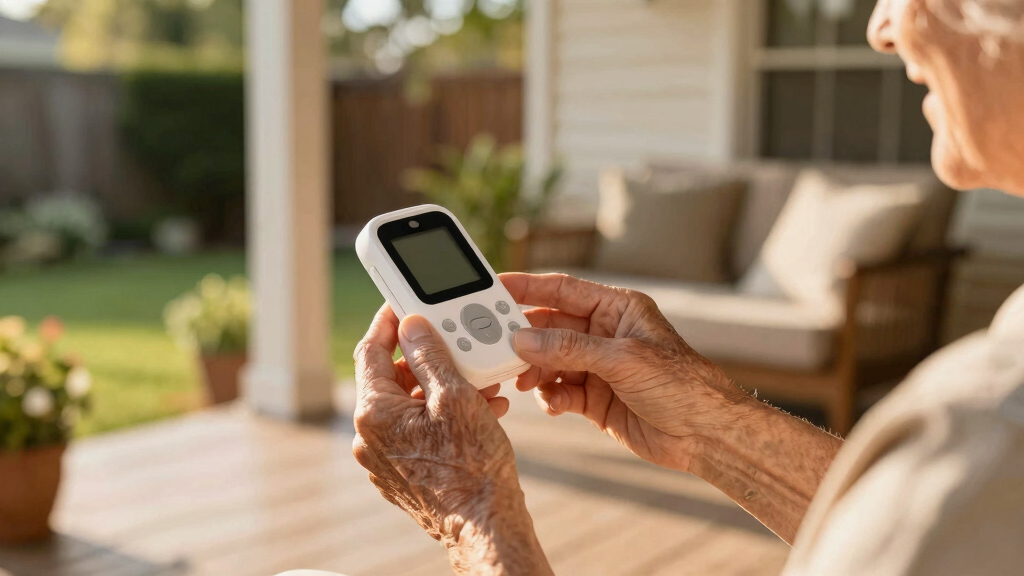
Medical alert systems come in many shapes: pendants, wristbands, mobile devices, or even smartwatches. Each has strengths depending on your mobility and comfort.
For instance, a senior with arthritis might prefer a lightweight wristband over a bulky pendant. If you’re frequently outside, a mobile device with GPS and fall detection offers peace of mind.
Ask: Are these devices easy to wear? Do they work reliably without frequent charging or maintenance?
How good is the monitoring center and response quality?
The heart of a medical alert system is its monitoring center. Ask if it’s staffed 24/7, where it’s located, and what certifications it holds. U.S.-based centers often provide faster, more familiar service during emergencies.
For example, some centers are certified by the Underwriters Laboratories (UL), which ensures high standards for emergency response.
Understanding the quality of the monitoring center is crucial because it directly impacts your safety. A highly trained, certified center can differentiate between real emergencies and false alarms, ensuring help is dispatched promptly when needed. Conversely, a subpar center might delay responses or mishandle situations, which could have serious consequences. Therefore, investing in a system with reputable, certified monitoring is a key tradeoff—sometimes paying a bit more for peace of mind that your emergency will be handled efficiently and professionally.
What are the costs and contract details?
Prices vary widely — from about $20 to $50 a month. But don’t just look at the sticker price. Ask about setup fees, equipment costs, and cancellation policies.
For example, some companies require a long-term contract, which might lock you in for a year or more, potentially leading to higher total costs if your circumstances change. Others offer month-to-month plans, providing flexibility but possibly at a higher monthly rate. Additionally, some providers charge for equipment upfront, while others include it in the monthly fee. Understanding these details helps you weigh the financial tradeoffs—longer contracts might offer discounts but limit flexibility, while no-contract options provide freedom but could be more expensive over time. Clarifying these aspects ensures you choose a plan that aligns with your budget and preferences, avoiding hidden fees or surprises down the line.
How reliable is the device’s battery and backup power?
Battery life matters—devices should last at least 24 hours on a single charge. Some systems include backup batteries for power outages, which can last up to 48 hours.
Imagine a storm knocking out your power — will your device still work? Ask about backup options and how often the batteries need charging or replacement.
This ensures help is available even during outages or emergencies. A device with a short battery life may require daily charging, which could be inconvenient or easily forgotten, risking device failure when you need it most. Backup power options are equally important because they safeguard against power outages—common during storms or other emergencies—ensuring continuous protection. Investing in a system with reliable backup power reduces the risk of being unprotected during critical moments, providing peace of mind that your safety isn’t compromised by technical issues.
Is setup simple and user-friendly?
Devices should be straightforward, especially for seniors or those with impairments. Ask if professional installation is included or if you can set it up yourself without hassle.
For example, a system with a big, easy-to-press button or clear instructions can make a real difference in an emergency.
Ease of use means you’re more likely to wear and rely on the device daily. If the setup process is complicated or confusing, it can discourage consistent use, which diminishes safety. A user-friendly system minimizes frustration and errors, ensuring that even those with limited technical skills can operate it confidently. This not only enhances safety but also promotes independence, as users are more likely to keep the device active and functional without needing frequent technical support.
What extra features could improve your safety and independence?
Look beyond the basics. Some systems offer medication reminders, GPS tracking, two-way voice communication, or integration with smart home devices like Alexa.
For instance, a system that can automatically alert emergency services if it detects a fall, combined with a reminder to take meds, could support your daily routine more fully.
Decide which features add real value to your lifestyle. Understanding the benefits and limitations of these extras helps you tailor your system to your specific needs, avoiding unnecessary features that may add cost without benefit or missing out on valuable safety tools that could prevent accidents or assist in daily routines.
How is your privacy protected?
Personal health data needs safeguarding. Ask the company how they protect your information and what their privacy policies are. Are data transmitted securely? Who has access?
For example, reputable companies encrypt data and limit access to authorized personnel only.
Feeling confident that your information stays private adds to your peace of mind. Privacy isn’t just about compliance; it’s about trust. Knowing your data is protected from breaches or misuse means you can rely on the system without fear of personal information being compromised. This trust becomes especially important when sensitive health data is involved, and choosing a provider with transparent, strict privacy policies ensures your safety extends beyond physical emergencies to your personal information as well.
What recent technological advances should you consider?
Technology evolves fast. Today, many services integrate with smart home systems, feature AI-powered fall detection, or offer remote health monitoring. Wireless, cellular-only devices are replacing landlines for greater flexibility.
For example, a smartwatch with fall detection and GPS can be worn anywhere, providing safety inside and outside your home. Staying updated with these innovations means you can benefit from systems that are more accurate, reliable, and integrated into your daily life. While some advanced features may come at a higher cost, they often provide significantly improved safety and convenience. Recognizing and understanding these technological trends allows you to choose a future-proof system that adapts as your needs evolve and technology advances, ensuring ongoing safety and independence.
Frequently Asked Questions
How do I know if a system is reliable during power outages?
Look for systems with backup batteries that last at least 24-48 hours. Ask the provider about their backup power options and how often batteries need replacement. This ensures the device works even when the power is out, keeping you safe.
Are medical alert services covered by Medicare or insurance?
Most Medicare plans don’t cover the cost of personal emergency response systems. However, some supplemental insurance or Medicaid programs might offer assistance. It’s best to check with your provider and explore available options in your area.
What happens if I accidentally trigger an emergency alert?
Most systems connect to a monitoring center that will verify the emergency. If you’re fine, you can cancel the alert. If not, help is dispatched immediately. Always inform your loved ones and the monitoring center about false alarms to avoid unnecessary responses.
Can I use a medical alert system outside my home?
Yes, many modern systems include mobile devices with GPS, letting you stay protected during outdoor activities. Check if the system offers on-the-go coverage if you’re often outside or traveling.
How do I cancel or switch services if I’m unhappy?
Most companies have a straightforward cancellation process—usually via phone or online. Review the contract terms beforehand to understand any fees or notice periods. Switching is simple once you choose a new provider that better fits your needs.
Conclusion
Choosing the right medical alert system begins with asking the right questions. Focus on coverage, device ease, response quality, and costs to find the best fit for your needs.
Remember, a well-chosen system isn’t just about safety — it’s about maintaining your independence and peace of mind. When in doubt, ask detailed questions and test the system before making a final decision.