
TL;DR

Turn quiet afternoons into listening time
- Thousands of audiobooks, podcasts and originals
- Listen on your phone, tablet or Echo — also offline
- Cancel anytime
To test a medical alert system, follow your provider’s approved test procedure, notify the monitoring center as instructed, and check that the alert reaches an operator who can hear you. Test each device and the places where you may use it, then record the result and report faults. No test can guarantee future service, and recommended schedules vary by provider.
A help button can beep in your hand and still leave an important question unanswered: did the alert reach someone who could hear you? A medical alert system only helps when its parts work together, from the wearable button and connection to the monitoring operator.
This guide walks you through a safe, practical check. You’ll learn how to contact the provider before testing, check the bedroom or bathroom where you might need help, and keep a simple record of results. Procedures vary by provider and device, so your manual and monitoring center set the rules. A test can reveal some problems; it cannot promise how the system will perform in a future emergency.
Follow the device manual or monitoring center’s test process, and ask how to avoid an unintended emergency dispatch.
Confirm that an operator receives the alert and can hear you; a light or beep alone does not check the full system.
Test from the actual safe locations where the wearer may need help, including relevant rooms or outdoor areas.
Check wearable fit, battery, charging, backup power, and any app or fall-detection feature you rely on using provider-approved methods.
Record the date, device, location, outcome, and support case, then retest after a repair or setup change.
Test the full alert path before it’s needed
A button light or beep does not confirm that an operator received the alert or can hear you. Follow your provider’s test procedure and check the places where the system will be used.
Use a safe test process
Your provider’s manual and monitoring center set the procedure.
Ask how to test and avoid an unintended emergency dispatch.
Use the designated test process or published number.
Check that an operator receives the alert and can hear you clearly.
Note the result, report faults, and confirm the system is ready for normal use.
Check real locations
With provider guidance, test from safe places where the wearer may need help.
Check each part you rely on
Fit and access
Check that the pendant or wrist button is comfortable, accessible, and not covered by clothing.
Battery and charging
Look for low-battery warnings and follow provider guidance for charging and backup power.
Home or mobile coverage
Check the base station or mobile unit where it will be used; cellular and GPS coverage can vary.
Features and contacts
Ask how to check fall detection, apps, caregiver alerts, and current account details.
Know when to retest
Follow the manufacturer’s schedule; if none is given, ask the provider what routine to use.
- Installation or a move
- Device or network changes
- Repair or setup change
- Date and devices tested
- Locations and outcome
- Faults and support case
Check the whole alert path, not just the button light
To test a medical alert system, check that the alert travels from the device to the monitoring center and that the operator can talk with you. A light, chime, or vibration can show that a button activated, but it does not confirm that the alert reached a person who can respond.
Think of the system as a chain: wearable button, base station or mobile unit, connection, and monitoring service. If your setup includes an app, caregiver notification, fall detection, or backup power, those pieces may need separate checks. For example, a daughter may receive an app notification even though the wearer’s voice does not carry clearly from the far end of the hallway. Each part tells you something different.
Before pressing anything, find the provider’s approved test method in the manual or by calling its published number. Tell the monitoring center you plan to test, and ask whether the test could contact emergency services. Do not assume the operator will recognize a test automatically. Avoid placing a real 911 call as a test unless the provider specifically tells you to do so.
Once you know the correct procedure, check what each step confirms. A self-test might check power or connectivity but not prove that a live operator received your alert. That difference matters when a reassuring beep tempts you to stop early. The next check is the conversation itself.
Products Worth Considering

Shark AV2501S AI Ultra Robot Vacuum with Self-Empty Base

Bose Lifestyle Ultra Wireless Home Speaker, White Smoke

Philips Hue Starter Kit with Bridge Pro and 4 Retrofit LED Recessed Downlights
As an affiliate, we earn on qualifying purchases.
Use a safe, repeatable process for every test
- Read the provider’s test instructions. Confirm whether to call first, use a test mode, or follow another approved method. Ask what to do if the system can dispatch emergency services.
- Notify the monitoring center as directed. Use the designated test process or published number. State clearly that this is a test.
- Activate the device you are checking. Use the wearable, base station, or mobile unit according to the instructions, and wait for a response.
- Confirm the operator received the alert. Ask whether they can hear you, and listen for a clear reply. Follow the operator’s instructions before ending the call.
- Record the result and return the system to service. Note any issue, confirm the device is ready for normal use, and contact support about a failure.
This order makes the test safer because it gives the monitoring center context before an alert arrives. For example, if a caregiver is helping an older adult test a pendant on a Tuesday morning, they can write down the provider’s instructions first and keep the phone nearby. If the operator does not answer as expected, they can stop and call support instead of repeatedly pressing the button.
Use your provider’s directions over a generic checklist. Services differ, and an online guide cannot tell you whether a particular button press will summon help. If the instructions are unclear, ask the monitoring center how to test without an unintended dispatch. Once the operator answers, take a moment to check whether conversation works where you need it.
Check that the operator can hear you from real rooms
During a test, confirm that the operator can hear you clearly from the places where you expect the system to work. A connection that sounds fine beside the base station may become faint behind a closed bathroom door or down a hallway. Two-way communication is part of the check, not an optional extra.
Tell the operator you are testing, then speak in your usual voice. Ask whether they can understand you and follow their directions. If your provider allows it, repeat the approved test from the bedroom, bathroom, porch, or other places where you might wear the device. For instance, a person who keeps a pendant on while folding laundry in a back room needs to know whether the operator can hear them there—not just beside the kitchen counter.
Room layout, walls, distance from a base station, and the position of the device can affect what happens. Try to check the actual setup: the door may usually be closed, a walker may be nearby, or clothing could cover a microphone. Don’t treat one successful conversation as proof that every location is covered.
If the operator cannot hear you, follow the provider’s positioning and troubleshooting instructions. Check the connection and battery, then contact support if the problem continues. Do not assume the system is ready while the audio problem remains unresolved. The same kind of real-world check applies if you use a mobile system away from home.
Test the places you actually use, including outside
Check coverage in the locations where the wearer may need help, using the provider’s approved test procedure. A home base station may reach one bedroom but not a distant patio, while a mobile system may behave differently in different outdoor areas. Coverage depends on the system and the place, so a test in one spot cannot answer for every other spot.
Consider a person who spends sunny afternoons on a small porch. If they test only from the living room, they have not checked the place where they often sit. With the provider’s guidance, they can test from the porch and note whether the alert arrives and the operator can hear them. A caregiver can help record the location without turning the check into a stressful production.
Mobile devices add another layer: cellular reception and location services can vary. Ask the provider how to test away from home and where the service is intended to work. If location sharing or GPS is part of the plan, ask what a test can confirm about location accuracy. A map marker in an app may offer useful information, but it does not automatically prove every connection feature is working.
Never test coverage by going somewhere unsafe or leaving the wearer without another way to call for help. Use familiar, safe places, and follow the provider’s guidance if an area has weak reception. Once you know where the system works, a few simple checks of the wearable and its power can help keep the setup ready.
Check fit, battery, charging, and extra features safely
A useful routine checks that the wearable is comfortable, accessible, and powered, as well as confirming that its alert connects. Look for low-battery warnings, inspect the charging contacts if the device recharges, and make sure clothing does not cover or block the button. Follow the manufacturer’s guidance for water exposure; not every pendant or wrist button is waterproof.
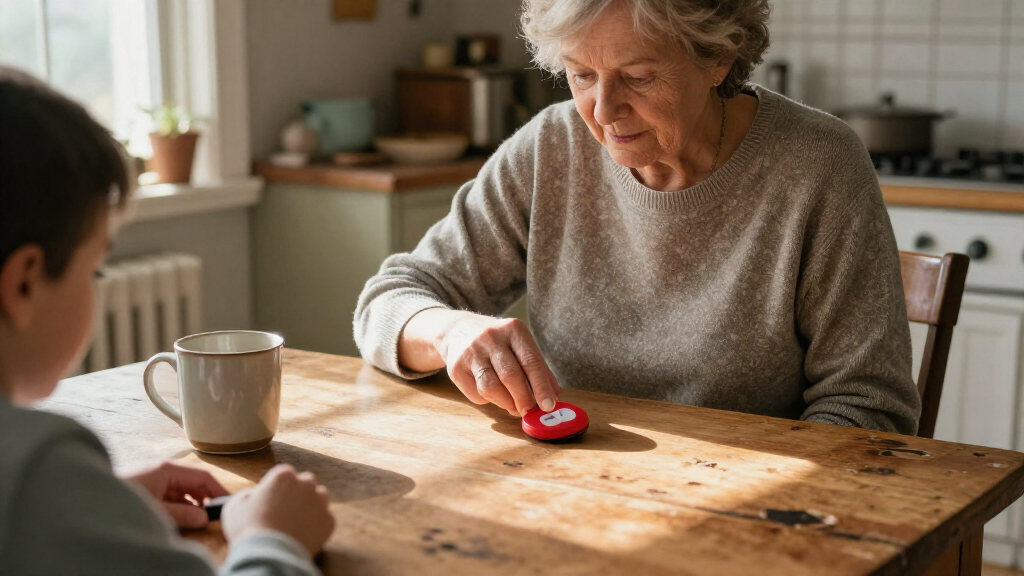
Imagine an older adult who puts on a pendant over a thick cardigan every morning. The button may be difficult to reach through the fabric, even though the device itself works. A quick fit check can catch that issue; the wearer can adjust where it sits or ask the provider what placement they recommend. Comfort matters too: a device left on a dresser because it rubs against the neck cannot help its wearer summon assistance.
Ask the provider how to check backup-battery status and what happens during a power or network outage. Some systems may have backup power; the details and expected behavior vary. If you rely on an app, caregiver alert, or automatic fall detection, ask how each feature can be checked. Fall detection may miss some falls or activate by mistake, depending on the device and circumstances.
Do not deliberately fall to test fall detection. Use only a provider-approved method, if one exists, and remember that the wearable help button remains important. Testing is also a good time to check less visible details, such as the contact information the service keeps on file.
Update the details that help people reach you
Check that the provider has current account details, including the wearer’s address, phone numbers, emergency contacts, entry instructions, and any relevant notes the wearer wants the service to have. A device can send an alert successfully and still lead to a delay if the response team has an old address or cannot reach the right contact. Accurate information is part of a useful system.
For example, a person may move from an upstairs apartment to a ground-floor unit but forget to update the address on the monitoring account. The device still powers on and the test operator still answers; the record is what has fallen out of date. A move, a new phone number, a changed entry code, or a caregiver who is no longer a contact can all make the old details less useful.
Ask the provider how to review or update this information. You do not need to share more personal detail than the service requests, and the wearer should be included in decisions about contacts and access instructions. If an emergency contact changes, confirm the new person knows they have been listed and how the provider may reach them.
It can help to check account details when the setup changes or during a scheduled device test. Write down the date you reviewed them, along with any support case number. That small record helps you remember what changed, and it creates a clearer history if you later notice a fault.
Keep a simple log and know what to do when a test fails
A brief test log helps you spot repeated trouble and explain it clearly to the provider. Record the date, device, location, result, and support case if you contact customer service. A notebook beside the charging dock or a note in a shared family calendar is often enough; you do not need a complicated spreadsheet.
For example, if tests from the bedroom work but tests from the porch fail twice, that pattern gives support a useful starting point. Note whether the operator answered, whether audio was clear, whether the device showed a low battery, and what the provider recommended. Include the date you retested after troubleshooting. Clear notes can save everyone from trying to reconstruct the issue from memory.
If a test fails, contact the provider promptly and ask whether the device needs charging, a reset, replacement, or a service check. Until the fault is addressed, know another way to contact help, such as a working phone within reach or an agreed check-in plan. Test again after a repair or change to confirm the affected part works, following the provider’s instructions.
Use the schedule in your manual or from the monitoring center. Some providers recommend monthly tests; others give a different interval. If no schedule appears, ask what they recommend and when to repeat a check after a move, device change, or connection change. Regular checks can catch some problems, but they cannot guarantee future operation as batteries, networks, equipment, and surroundings change.
Frequently Asked Questions
How often should I test a medical alert system?
Follow the schedule in your manual or from the monitoring provider. Some providers recommend monthly checks, while others set a different interval; if you cannot find a schedule, ask the monitoring center. Test after a move or device or network change if the provider recommends it.
That depends on the system and its test procedure. Contact the monitoring center first and follow its instructions; do not assume the service automatically recognizes a test. Do not use a real 911 call as a test unless the provider specifically directs you to.
Can I test it without contacting the monitoring center?
Some devices offer a self-test, but it may check only power or connectivity. Ask the provider what the feature confirms and whether it verifies that an alert reaches an operator. A light or beep on its own does not establish that two-way communication works.
How do I check whether the system works in the bathroom or bedroom?
Use the provider’s approved process from the actual room, and confirm that an operator receives the alert and can hear you. Walls, distance, closed doors, and device placement can affect coverage. Choose safe locations and record where you tested.
Should I deliberately fall to test fall detection?
No. Deliberately falling can cause injury, and fall detection may miss some falls or activate by mistake. Ask the provider whether an approved test method exists, and continue to use the help button as directed.
What should I do if the operator cannot hear me or a test fails?
Follow the provider’s positioning and troubleshooting instructions, check power and connection as directed, and contact support if the problem continues. Ask whether the device needs a reset, replacement, or service check. Know another way to call for help while the issue remains unresolved, and test again after support addresses it.
Does a successful test guarantee the system will work in an emergency?
No. A successful test confirms what worked at that time and place; batteries, networks, equipment, or conditions can change later. Regular checks can reveal some faults, but they cannot guarantee future service. Maintain the device and know another way to contact help.
Conclusion
Make each test a short, provider-approved check of the whole path: the device, the connection, the operator, and the places where you use it. Keep the instructions and a simple log where a caregiver can find them, and report failures instead of treating a beep as proof.
A test cannot promise what tomorrow will bring. It can give you a clearer view of today’s setup—like switching on a porch light before dusk and noticing whether the far corner stays dark.