
TL;DR
Listen free for 30 days with Audible
Thousands of audiobooks and originals — cancel anytime.
Start your free trialAs an affiliate, we earn on qualifying purchases.
In-home medical alert systems are ideal for those mostly at home, while mobile alerts suit active individuals or travelers. Both options have unique features, costs, and coverage areas. Your choice hinges on your daily routines and safety priorities.
Imagine this: you’re out for a walk, enjoying the fresh air, when suddenly you stumble. A fall could mean serious injury. Now, consider the safety nets available—in-home and mobile medical alert systems. Both are designed to give peace of mind, but they serve different needs. Understanding which fits your lifestyle isn’t just about price—it’s about how and where you spend your days.
This guide walks through the key differences, recent tech upgrades, and real-world scenarios. Whether you’re mostly at home or constantly on the move, you’ll find practical insights to help you make the right choice for your safety and independence.
What Exactly Is an In-Home Medical Alert System—and Why It Might Be Perfect for You
An in-home medical alert system is a setup that stays put in one place, usually connected to your landline or Wi-Fi. It typically includes a base station and a wearable button—like a pendant or wristband—that you press in an emergency. Imagine being able to shout for help with a simple push, even if you can’t get to a phone.
This system is ideal if you spend most of your time at home. It’s reliable, often less costly, and easy to use. For example, if you tend to fall in the bathroom or kitchen, this setup ensures help is just a button away. Many models also include fall detection or two-way voice, so help arrives even if you’re unable to press the button.
Understanding the core features of in-home systems helps clarify their importance. They offer a dependable safety net within your daily environment, where most emergencies happen. The simplicity and lower cost are significant tradeoffs—while they excel indoors, their limited mobility means they won’t protect you if you’re outside or away from your home environment.

ADT Medical Alert Plus – in-Home Emergency Response System, Fall Detection
- Activation: Free activation with no contracts
- Range: 600ft pendant range for freedom
- Monitoring: 24/7 U.S.-based monitoring services
As an affiliate, we earn on qualifying purchases.
As an affiliate, we earn on qualifying purchases.
Why Mobile Medical Alerts Are a Game-Changer for Active Lifestyles
Mobile medical alert systems are designed for those who want to stay active outside the house. They use cellular networks, so you can press a button from anywhere within coverage—whether you’re walking in the park, grocery shopping, or visiting a friend’s house. Think of it as having a safety network wrapped around your daily adventures.
Recent improvements include GPS tracking, so responders can pinpoint your location instantly. For instance, if you’re hiking and fall, a mobile alert can tell rescuers exactly where you are—saving precious time. These systems are perfect for active seniors who refuse to sit still or those who travel frequently. The key tradeoff is that they require a good cellular signal and regular charging, which can be a concern if you’re in remote areas or forget to maintain your device. Nonetheless, their flexibility can significantly reduce the risk of being isolated in an emergency far from home, providing peace of mind during outdoor activities or travel.
Choosing a mobile alert system means embracing a balance—accepting the need for regular charging and ensuring coverage is reliable, but gaining the freedom to stay active and independent without sacrificing safety.

Bay Alarm Medical SOS Mobile GPS – 24/7 Medical Alert with Optional Fall Detection for Seniors – Call to Activate – 4G GPS Medical Alert System with Elderly Tracking – Panic Button for Seniors
- Easy Setup: Includes simple, quick instructions
- Subscription Needed: Requires ongoing service plan
- 4G LTE Connectivity: Reliable nationwide cellular coverage
As an affiliate, we earn on qualifying purchases.
As an affiliate, we earn on qualifying purchases.
How Do They Stack Up? In-Home vs Mobile Medical Alerts Compared Side-by-Side
| Feature | In-Home System | Mobile System |
|---|---|---|
| Coverage Area | Limited to your home or property | Anywhere with cellular signal |
| Mobility | Stationary, best for indoor use | Portable, great for active lifestyles |
| Installation | Usually straightforward, some need professional setup | Plug and go, just charge and carry |
| Cost | Lower monthly fees, equipment often cheaper | Higher monthly fee, device costs more |
| Features | Fall detection, two-way voice, automatic alerts | GPS, fall detection, activity tracking |
| Ideal User | Primarily at home, less mobile | Active, travels often, outdoors |
Choosing depends on where you spend most of your time. Do you mostly stay home or enjoy outdoor activities? The right system makes all the difference in how safe you feel daily.
While the table provides a quick overview, it’s important to consider the implications of each feature. For example, GPS in mobile systems enables location tracking, which is vital in emergencies outside the home but might raise privacy concerns for some users. Similarly, fall detection is a crucial safety feature, but its effectiveness can vary depending on device placement and user activity. Recognizing these tradeoffs helps you select a system that truly aligns with your lifestyle and safety priorities.
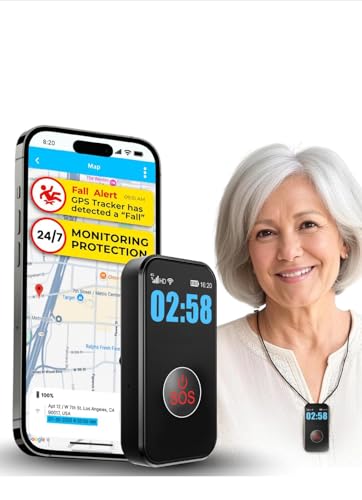
SecuLife Medical Alert Pendant for Seniors — Alerts Go Direct to Family, No Call Center | Auto Fall Detection, GPS Tracking, 2-Way Calling, No Contract, Waterproof Necklace
- Fall Detection and SOS Alerts: Automatically detects falls and sends SOS
- Easy Activation: Monthly subscription required for full features
- Two-Way Calling: One-touch emergency calls with auto-answer
As an affiliate, we earn on qualifying purchases.
As an affiliate, we earn on qualifying purchases.
Recent Tech Upgrades Making Mobile Alerts Smarter and More Reliable
Tech advances are changing the game. Modern mobile alerts now include GPS that’s more precise than ever, even in dense urban areas or wooded trails. Some systems incorporate AI to monitor patterns—like sudden inactivity—that could signal a fall or emergency.
Devices are also slimmer, more stylish, and easier to wear. Battery life has improved too—many last 24-48 hours on a single charge. Imagine heading out for a walk, confident that your device is discreet, dependable, and ready to connect you to help at a moment’s notice.
These technological upgrades matter because they directly impact safety and user confidence. Precise GPS reduces response times, which can be critical during emergencies. AI-driven pattern recognition can alert caregivers to potential issues before they escalate, enabling proactive care. The improved design and longer battery life also mean the device is less intrusive and more reliable, encouraging consistent use. These innovations collectively make mobile alerts a smarter, more dependable safety option for those who need them most.
SecuLife Medical Alert Pendant for Seniors — Alerts Go Direct to Family, No Call Center | Auto Fall Detection, GPS Tracking, 2-Way Calling, No Contract, Waterproof Necklace
- Fall Detection and SOS Alerts: Automatically detects falls and sends SOS
- Easy Activation: Monthly subscription required for full features
- Two-Way Calling: One-touch emergency calls with auto-answer
As an affiliate, we earn on qualifying purchases.
As an affiliate, we earn on qualifying purchases.
Cost and Coverage: What to Expect When Budgeting for Safety
Cost is a key factor. In-home systems usually start around $20–$50 per month, with some requiring a one-time setup fee. They’re often covered by insurance or Medicare in certain regions, making them more affordable.
Mobile systems tend to be pricier—ranging from $40–$100 per month. They include cellular service, which adds to the cost but offers unmatched flexibility. When considering these costs, it’s important to weigh the value of mobility and peace of mind against your budget constraints. For example, if you frequently travel or enjoy outdoor activities, the higher monthly expense might be justified by the increased safety and independence it provides. Conversely, if your routines are mostly indoors, the lower-cost in-home system might be more practical. Remember, some insurance plans or Medicare options can offset these costs, so check your coverage options carefully to make an informed financial decision.
Ask These 4 Questions Before Picking Your Safety System
- How often do I spend time outside my house? If frequently, a mobile alert is more suitable.
- Do I have reliable cellular coverage in my usual areas? Poor signal favors in-home systems.
- What’s my budget? Mobile alerts cost more monthly but offer more freedom.
- Do I need features like GPS or fall detection? Modern systems often include both, but check carefully.
Key Takeaways: Your Quick Guide to Choosing Safety Systems
- Assess your daily routine: Active outside, opt for mobile; mostly at home, go for in-home.
- Check coverage areas: Reliable cellular signal ensures mobile devices work everywhere.
- Balance cost and features: Mobile alerts cost more but offer GPS and activity tracking.
- Consider ease of use: Devices should be simple, with one-touch buttons and clear instructions.
- Stay updated on tech advances: New AI and GPS improvements boost safety and reliability.
These key points help you make an informed decision, recognizing that the right safety system depends on your unique lifestyle, safety priorities, and comfort with technology. Taking the time to evaluate these factors ensures you select a solution that provides peace of mind and supports your independence long-term.
Frequently Asked Questions
Can I switch from an in-home to a mobile alert system later?
Yes. Many providers offer flexible options to upgrade or switch systems as your needs change. It’s worth checking with your provider about compatibility and any potential fees involved.
Are mobile alerts reliable in rural areas?
Reliability depends on cellular coverage. If you live in an area with poor signal, an in-home system might be more dependable. Always test your device in your usual environment before committing.
How long do batteries last on mobile alert devices?
Most mobile devices last between 24 to 48 hours on a single charge. Regular charging is essential to keep your safety net active during your outings.
Will my insurance cover these systems?
Coverage varies. Some long-term care policies or Medicare plans may help offset costs. Check with your provider or insurance agent for specifics related to your plan.
Emergency protocols differ by system. Usually, responders or contacts are notified, and help is dispatched. It’s good to set up trusted contacts and understand how your system handles unresponsive alerts.
Conclusion
Choosing between in-home and mobile medical alert systems isn’t just about price. It’s about matching safety tools to your lifestyle. Think about where you spend your days, how often you’re outside, and what features give you peace of mind.
Whatever your choice, the right system can make all the difference—letting you enjoy independence while knowing help is just a button away. Safety isn’t just a device; it’s a feeling of confidence in every step you take.
Back to school Picks
back to school
As an affiliate, we earn on qualifying purchases.